

How to Write Better Email Subject Lines

Learn how to write effective, trustworthy email subject lines that set clear expectations, reflect your brand, and drive engagement—without relying on tricks or misleading tactics.

How to Write Better Email Subject Lines
Brandset TeamBrandset Team16 min de leitura

A subject line has one job before the email is opened: help the reader decide whether this message deserves their attention.

That sounds simpler than "maximize open rate," and that distinction matters. A subject line can generate curiosity and still be bad. It can produce more recorded opens while attracting the wrong expectation. It can win an A/B test and still lead to fewer clicks, more unsubscribes, or weaker conversions. Open-rate measurement itself has substantial limitations — privacy features such as Apple's Mail Privacy Protection can load remote email content independently of deliberate reader interaction, and Gmail says it doesn't track sender open rates or verify third-party open-rate accuracy.

So the better question isn't "how do I trick more people into opening this?" It's how do you make the right person understand why this email might be worth opening.

In short:

  • The subject line is a promise. The email has to keep it:Borrowed curiosity generates opens today and costs trust tomorrow — Google and CAN-SPAM both treat deceptive subject lines as a real compliance issue, not just a style problem.

  • Specific beats vague, almost every time: "Three new workflow templates are live" gives the reader something to evaluate. "Something exciting is coming" gives them nothing.

  • Urgency belongs in the subject line when urgency exists in the offer: Fake deadlines don't just underperform — they teach subscribers to stop believing your real ones.

  • The best subject line cannot rescue a bad email program: If people never really opted in, if the sender identity keeps changing, or if unsubscribing is hard, the subject line was never the main problem.

The strongest email subject lines tend to do four things well: set an accurate expectation, give the reader a reason to care, communicate enough before the text gets truncated, and sound like the sender rather than a subject-line generator. Everything else is a variation on those principles.

The 15 Principles

1. Treat the Subject Line as a Promise

The subject line establishes an expectation. The email needs to fulfill it.

If the subject says "The onboarding mistake costing us customers" and the email is actually a generic product promotion, you created curiosity by borrowing against trust. If it says "Three changes we made to onboarding" and the email explains those three changes, the relationship is intact.

This is more than editorial preference. Google's sender guidelines say subject lines, headers, display names, and message content should accurately represent the sender and the content of the message, specifically warning against misleading tactics such as adding "Re:" or "Fwd:" when the message isn't actually a reply or forward. For commercial email in the United States, CAN-SPAM also prohibits deceptive subject lines. The rule is simple: if someone opens because of the subject line, the email should justify that decision.

2. Specific Usually Beats Vague

Weak

Strong

Something exciting is coming

Three new workflow templates are live

Big news!

You can now duplicate landing pages

You need to see this

The welcome email mistake we keep seeing

Specificity gives the reader something to evaluate. They may still decide not to open. That's fine. The objective isn't to make every subscriber open every email. It's to make the value legible to the people for whom that particular email matters.

3. Put the Important Information Early

There's no universal subject-line character count that works across every inbox, device, font size, and interface. That makes rigid rules such as "always stay under 40 characters" less useful than they appear.

A more durable practice is to front-load meaning:

  • Instead of "Everything you need to know about the new templates we released this week," try "New templates: what's inside."

  • Instead of "A few things I learned after rebuilding our welcome sequence," try "What rebuilding our welcome sequence taught us."

If truncation happens, the useful information survives. Think about priority rather than character count.

4. Write Like the Sender

Many weak subject lines are technically correct. They simply sound like marketing: "Unlock your full potential today," "Transform your business with these powerful tips," "Elevate your marketing strategy," "Don't miss this incredible opportunity." These phrases could come from almost any business. That's the problem.

A strong subject line should feel compatible with the voice subscribers encounter everywhere else:

  • A founder newsletter may sound conversational — "I changed my mind about AI agents."

  • A technical publication may be direct — "Gmail's sender rules, explained."

  • A product company may prioritize utility — "You can now customize forms with AI."

  • A retailer may be much more product-forward — "The linen collection is back."

Different brands shouldn't converge on the same vocabulary simply because they use the same email software.

5. Curiosity Works Best When Something Real Sits Behind It

Curiosity is useful. Vagueness is not the same thing.

Compare "I wasn't expecting this" with "The landing page test that surprised us." The second still creates an information gap, but it gives the reader enough context to decide whether the gap is interesting. Or "This changed everything" versus "The pricing change that cut our sales calls in half" — the second is stronger if that result is real and the email actually explains it.

Curiosity should emerge from interesting information. It shouldn't compensate for the absence of interesting information.

6. Use Numbers When They Make the Subject More Concrete

Numbers can make a subject line specific — "7 questions to ask before rebuilding your website," "What we learned from 214 signup flows," "The $400 mistake in our checkout flow." But numbers aren't inherently persuasive. "7 AMAZING ways to 10X your marketing!!!" doesn't get rescued by the number.

Use numbers when they represent something meaningful in the email — a count, a timeframe, a result, a price, a dataset. Don't invent precision merely because numbered subject lines look more concrete.

7. Avoid Manufactured Urgency

Urgency belongs in the subject line when urgency exists in the offer.

Good, when true: "Registration closes Friday" · "Early pricing ends tonight" · "Applications close August 30" · "Last day to order for holiday delivery"

Less defensible, when nothing actually changes: "ACT NOW!!!" · "Last chance!!!" · "Don't miss out!!!"

An accurate deadline gives the reader useful information. Fake urgency attempts to manufacture a decision. The subject line should reflect the real conditions of the offer, consistent with the broader requirement that commercial email subjects accurately represent the message.

8. Do Not Turn Every Email Into an Emergency

Urgency loses meaning when everything is urgent. If every campaign says "Last chance," "Ends tonight," "Final call," "Don't miss this," the inbox learns that your business is permanently having its final sale.

Your subject-line mix should reflect the actual variety of the relationship. Some emails are educational. Some announce things. Some tell stories. Some make offers. Some are genuinely time-sensitive. Some simply contain something useful. That variety makes the urgent messages more credible when they eventually appear.

9. Personalization Should Have a Reason

Putting a first name in a subject line doesn't automatically make an email personal. "Fabio, our sale starts now" contains personalization data. It may still feel entirely generic.

Context can be much more meaningful — "Your website audit is ready," "Next steps for Thursday's workshop," "A guide for your first Brandset campaign." Use personal information when it helps explain why the message is relevant. Avoid personalization that mainly demonstrates how much you tracked. The reader should think "this makes sense for me," not "why do they know that?"

10. Emojis Are a Voice Decision, Not a Growth Hack

There's no need to ban emojis from subject lines. There's also no reason to add one to every send.

Use them when they fit — "New templates ✨" might be natural for one brand, and out of character for another. Google's guidance focuses on deceptive use, such as using emojis or non-standard characters to imitate verification or other interface elements. The useful test is simpler: would this brand naturally communicate this way elsewhere? If yes, an emoji may work. If not, it's decoration.

11. Subject Line and Sender Name Work Together

Subscribers don't encounter the subject line in isolation. They also see who sent the message. A subject such as "A decision I regret" means something different when the sender is "Fabio at Brandset" than when the sender is "Marketing Team."

Google recommends consistent, accurate display names that clearly identify the sender and warns against using the display-name field as another promotional headline. Think of the inbox as a small system:

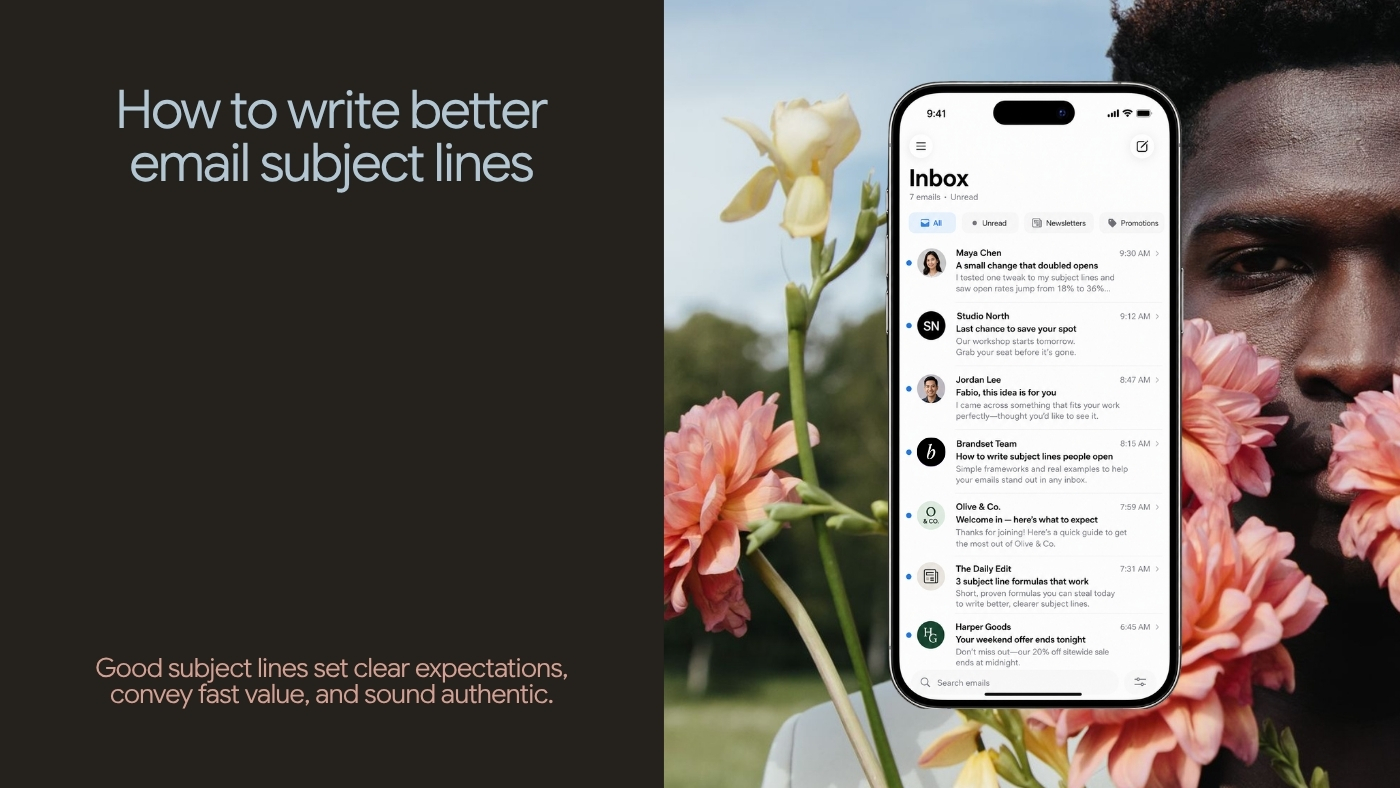
Sender → Subject → Preview

Each element can contribute information. They don't all need to perform the same job.

12. Use Preview Text to Finish the Thought

Many inbox interfaces expose another line of text beside or beneath the subject. Use it. Preview text can clarify, add specificity, provide another benefit, introduce a secondary idea, explain urgency, or complete the setup. Don't simply repeat the subject.

Subject

Preview

Your welcome sequence is doing too much

Five emails may be solving a problem three could handle.

New workflow templates

Welcome, lead capture, nurture, and customer onboarding are now included.

Registration closes Friday

The workshop starts Monday and includes a live landing-page review.

Subject and preview should work together — think of them as two lines of the same pitch, not one line repeated twice.

13. A/B Tests Should Answer a Question

An A/B test is much more useful when it begins with a hypothesis. "Subject A vs. Subject B" is a weak test. "Does this audience respond better when we lead with the problem or with the outcome?" is a better one.

Problem-led: "Why welcome sequences lose subscribers" Outcome-led: "Build a welcome sequence people keep reading"

Specific: "5 questions before you redesign your site" Curiosity-led: "Read this before redesigning your site"

Now the test can teach you something beyond which exact string happened to win. Over time, you learn how the audience responds to different communication strategies.

14. Do Not Judge the Test Only by Open Rate

This matters increasingly. Apple's privacy protections can load remote email content regardless of deliberate interaction, while Gmail explicitly says it cannot verify third-party open-rate accuracy.

Suppose Subject A produces more recorded opens. Subject B produces more useful clicks, more purchases, more registrations, fewer unsubscribes, fewer complaints. Which one won? It depends on the job of the email:

  • For a product launch, downstream product interest may matter more.

  • For an event, registrations matter.

  • For a newsletter, meaningful clicks, replies, and long-term subscriber behavior may matter.

Treat opens as one signal. Don't let them define the entire quality of the subject line.

15. Protect Trust From Short-Term Optimization

Imagine testing "August product update" against "URGENT: You need to see this." Version B may attract more immediate attention. That wouldn't automatically make it the better subject.

Subject lines train the audience. Repeated exaggeration teaches subscribers that your urgency is meaningless. Repeated vagueness teaches them that the inbox can't predict the value inside. Repeated accuracy does something useful too — readers learn that when this sender says something is worth their attention, it usually is. That accumulated expectation is more valuable than squeezing another marginal open from one campaign.

50 Email Subject Line Examples

These are starting points, not formulas. Adapt them to the actual email, audience, and brand voice.

Editorial and Newsletter

  1. What changed my mind about AI agents

  2. The marketing metric I stopped trusting

  3. Why small teams keep over-automating

  4. A better way to think about landing pages

  5. What nobody tells you about going solo

  6. The problem with "all-in-one" software

  7. Three things worth reading this week

  8. What we learned from rebuilding our onboarding

  9. The idea I've been testing all month

  10. A small change in how I think about growth

Educational and How-To

  1. How to clean an email list safely

  2. Build your first welcome workflow

  3. Five questions before redesigning your website

  4. How to write a clearer landing-page headline

  5. A practical guide to SPF, DKIM, and DMARC

  6. How to turn one service into a clear offer

  7. What to automate first in a solo business

  8. A better way to segment a small email list

  9. How to test your newsletter before sending

  10. Start here if your email isn't converting

Product and Feature Updates

  1. New workflow templates are live

  2. You can now duplicate landing pages

  3. A faster way to build forms

  4. Dark-mode preview is now available

  5. What's new in Brandset this month

  6. Your Brand Center just got more useful

  7. Meet the new email editor

  8. We simplified website publishing

Offers and Time-Sensitive Emails

  1. Registration closes Friday

  2. Early pricing ends tonight

  3. Applications close August 30

  4. The workshop starts Monday

  5. Two days left to register

  6. Your trial ends tomorrow

  7. Enrollment is open

  8. Last day for launch pricing

Use these only when the deadline or constraint is genuine.

Story and Founder Emails

  1. The mistake behind our first launch

  2. I was wrong about this

  3. Why we rebuilt Brandset

  4. The week everything broke

  5. The customer conversation I keep thinking about

  6. What bootstrapping changed for me

  7. A decision that looked smarter on paper

  8. What building with a small team taught me

Relationship and Re-Engagement

  1. Still want these emails?

  2. Should I keep sending this?

  3. What would make this newsletter better?

  4. You may have missed this

  5. Want fewer emails?

  6. Before I stop emailing you

Use re-engagement subject lines carefully, and only when the email itself gives subscribers a clear, respectful choice.

Subject Line + Preview Text Examples

A few combinations show how much stronger the inbox becomes when both elements do different work.

Type

Subject

Preview

Newsletter

The problem with AI productivity

Faster execution does not fix a badly designed process.

Educational

Build your first welcome workflow

Start with the customer state, not a seven-email template.

Product

New workflow templates are live

Start with welcome, lead capture, nurture, or onboarding.

Story

Why we rebuilt Brandset

The original product solved tasks. We wanted to solve the system.

Event

Registration closes Friday

The workshop starts Monday and includes a live page review.

Re-engagement

Still want these emails?

Update your preferences or unsubscribe in one click.

Subject Lines to Be Careful With

Certain patterns are worth challenging before sending.

  • Fake replies — "Re: your account" when no conversation exists.

  • Fake forwarding — "Fwd: important information" when nothing was forwarded. Google specifically warns against both practices.

  • Manufactured emergencies — "URGENT ACTION REQUIRED" for an ordinary promotion.

  • Impossible claims — "Double your revenue tomorrow" without evidence or a credible mechanism.

  • Empty curiosity — "You won't believe this," with nothing specific behind it.

  • Generic AI-sounding language — "Unlock the power of your marketing."

  • Meaningless personalization — "Fabio, special message for you," when the same email went to everyone.

  • Excessive formatting — "🚨🚨🔥 LAST CHANCE!!!!! 🔥🚨🚨"

The issue isn't merely aesthetics. The message begins to look like it's trying harder to capture attention than to communicate information.

Build a Subject Line System, Not a Swipe File

A swipe file is useful. Your own data is more useful. Create a simple record for your sends:

  • Subject — what was sent

  • Preview — what supported the subject

  • Email type — newsletter, product, promotion, onboarding

  • Audience — who received it

  • Strategy — specificity, curiosity, problem, outcome, story, deadline

  • Downstream result — clicks, conversions, replies, unsubscribes, complaints

Over time, patterns appear. Maybe your audience responds well to specific problems, straightforward feature announcements, contrarian observations, founder stories, or short questions. Maybe it ignores generic how-to language, artificial suspense, sale language, or broad claims. Those patterns are worth more than an internet list of "100 subject lines guaranteed to increase opens."

Your Inbox Can Still Teach You Something

Periodically review your own inbox. Look at messages you opened without hesitation. Then ask why — was it the sender, the topic, the specificity, the timing, the existing relationship, a promise you trusted?

Then look at messages you ignored. Was the subject irrelevant, generic, too promotional, unclear, or from someone you no longer remember subscribing to?

This exercise is useful precisely because it reminds you of something subject-line optimization often forgets: the relationship with the sender matters. The world's cleverest subject line cannot manufacture a relationship that does not exist.

The Best Subject Line Cannot Rescue a Bad Email Program

If subscribers didn't knowingly sign up, the subject isn't your main problem. If they no longer find the emails useful, the subject isn't your main problem. If the sender identity keeps changing, the subject isn't your main problem. If every email is a promotion, the subject isn't your main problem. If the content regularly disappoints after the open, the subject isn't your main problem. If people want to unsubscribe and can't do so easily, the subject is definitely not your main problem.

Gmail's current sender guidance emphasizes clear opt-in, accurate messages, easy unsubscribe, healthy complaint rates, and understandable sender identity alongside technical authentication requirements. Subject lines operate inside that larger relationship.

A Practical Subject Line Checklist

Before sending, ask:

  • Is it accurate? Will the email fulfill the expectation created by the subject?

  • Is it specific enough? Can the reader understand why the email might matter?

  • Does the useful information arrive early? If the text is shortened in the inbox, does the important part survive?

  • Does it sound like us? Would this subject make sense beside the rest of the brand?

  • Is the urgency real? If there's a deadline, does something genuinely change afterward?

  • Does personalization add relevance? Or are we merely demonstrating that we have data?

  • Does the preview text add something? Avoid using it to repeat the subject.

  • Is the sender recognizable? Subject line optimization can't compensate for unclear sender identity.

  • What is this email actually trying to accomplish? Use that outcome to evaluate performance.

  • Would we be comfortable sending this subject repeatedly? Short-term attention shouldn't come at the expense of long-term trust.

Where Brandset Fits

Subject lines are easier to write when the system creating them already understands the business. Brandset's Brand Center keeps shared context such as voice, positioning, audience information, products, services, colors, and typography closer to the marketing work. Inside Email Marketing, AI assistance can use that broader brand context when helping create campaign content and subject-line ideas instead of treating every new email as an unrelated writing prompt.

That doesn't remove the final editorial decision. You still need to decide what matters in this email, which expectation the subject should create, what this audience would actually care about, whether the language is accurate, and whether it sounds like the brand. AI can generate options. The sender still owns the promise.

Start your 7-day free trial →